
New hire starts Monday. You’ve got a stack of compliance forms, three different training links, and a calendar already full of client work. Sound familiar? For HR professionals and business owners at small to medium-sized service firms, training module delivery often feels like juggling while running. The stakes are real: missed compliance deadlines create legal exposure, day-one overload kills engagement, and scattered tools make audit prep a nightmare. This guide walks you through exactly how to plan, execute, and verify HR training delivery so your team is prepared, your records are clean, and your onboarding actually works.
Table of Contents
-
Step-by-step: Delivering training modules for onboarding and compliance
-
Making training stick: Interactive content and real scenarios
-
Perspective: Why “check-the-box” fails and what actually works
Key Takeaways
| Point | Details |
|---|---|
| Phase training for retention | Break modules into manageable phases instead of cramming everything on day one. |
| Use scenario-based learning | Interactive scenarios improve employee judgment and real-world readiness. |
| Automate tracking and reminders | Digital tools help ensure completion and support audit-readiness without micromanagement. |
| Go beyond completion metrics | Measure skill gains and behavioral results to show true HR training impact. |
| Continuously refresh content | Review and update HR modules each year to meet current legal requirements and business needs. |
What you need before delivering HR training modules
With the stakes established, you must clarify foundational requirements before launching any training delivery sequence. Skipping this step is where most small firms hit the “compliance cliff,” that moment when a new hire finishes their first week and nobody can confirm what they actually completed or signed.
Before you send a single training link, get these essentials in order:
-
Documentation and authorizations: Confirm that offer letters, I-9s, tax forms, and policy acknowledgments are either signed or queued for e-signature before training begins.
-
Platform access: Your learning management system (LMS) or onboarding portal should be configured with the new hire’s role, department, and location before day one.
-
Training content inventory: Know which modules are required by law, which are role-specific, and which are optional. Not everything belongs in week one.
-
Compliance checklist: A single source of truth that maps each required training to a deadline, a responsible party, and a completion status.
-
Employee data: Name, start date, role, and location all affect which training rules apply. Get this right upfront.
A practical approach to compliance and onboarding integration separates three distinct phases: administrative and legal readiness before training begins, a phased learning sequence during onboarding, and audit-ready evidence of completion after the fact. Treating these as one big blob is exactly what creates chaos.
| Task | Manual approach | Digital approach | Audit-ready? |
|---|---|---|---|
| Collect e-signatures | Email PDFs back and forth | Integrated e-signature in portal | Yes, with timestamps |
| Track form completion | Spreadsheet updated manually | Auto-updated dashboard | Yes, with version history |
| Assign training modules | Send links via email | Role-based auto-assignment | Yes, with delivery proof |
| Store acknowledgments | Shared drive folders | Centralized document repository | Yes, with access logs |
| Send reminders | Manual calendar alerts | Automated deadline reminders | Partial |
Pro Tip: Pre-schedule all paperwork and administrative tasks to be completed before the employee’s first training module. That way, day one is about learning and culture, not filling out forms under pressure.
Step-by-step: Delivering training modules for onboarding and compliance
Once you have your prerequisites, follow these stepwise actions for practical, effective delivery. This is where the process either flows smoothly or falls apart, and the difference usually comes down to sequencing.
Step 1: Conduct a gap assessment. Identify what training currently exists, what is legally required for each role, and where the gaps are. For a small accounting firm, that might mean discovering that harassment prevention training is current but data privacy training is two years out of date.
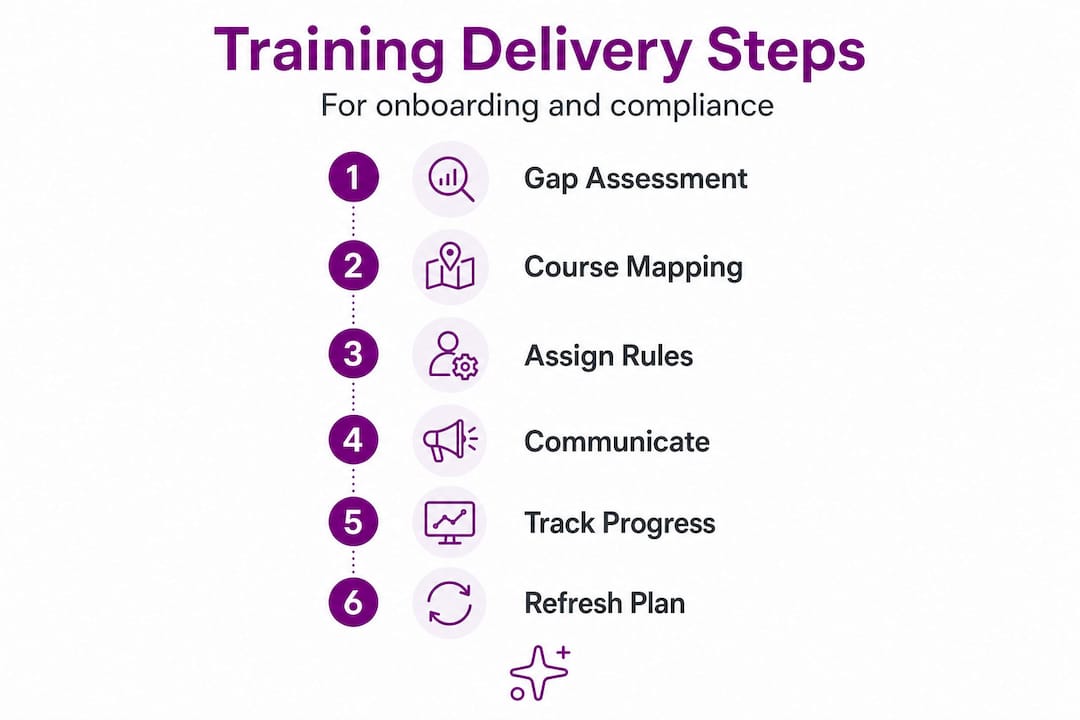
Step 2: Map your course catalog. Match required training topics to specific modules. Separate legally mandated content (harassment prevention, safety, data privacy) from role-specific skills training and general culture content. Building a scalable training program for small to mid-sized firms typically starts with this catalog mapping step before anything else.
Step 3: Configure LMS assignment rules. Set up role-based and location-based rules so the right modules automatically assign to the right people. A paralegal in California has different compliance requirements than an office manager in Texas. Getting this right once saves enormous rework later.
Step 4: Build your rollout and communication plan. Tell new hires what to expect, when each module is due, and how long it will take. Ambiguity kills completion rates. A simple email sequence with clear deadlines and a “why this matters” sentence for each module goes a long way.
Step 5: Track completion in real time. Do not wait until the end of the first month to check who finished what. Use your platform’s dashboard to monitor progress daily during the first two weeks, then weekly after that.
Step 6: Build a refresh plan. Training is not a one-time event. Schedule annual reviews of every module, and flag any content that needs updating after regulatory changes or internal policy shifts. Annual compliance tracking is a discipline, not an afterthought.
For remote hires specifically, delivery mechanics shift considerably. Remote onboarding requires secure digital workflows, a scheduled communication cadence, role-based training milestones, and automated reminders for deadlines. You cannot rely on a manager popping by the desk to check in.
| Step | Timing | In-person logistics | Remote logistics |
|---|---|---|---|
| Gap assessment | Pre-hire | HR review meeting | Async document review |
| Course mapping | Pre-hire | LMS configuration | Same, plus VPN/access setup |
| LMS assignment | Day 1 | Portal login at desk | Digital credentials emailed securely |
| Communication plan | Day 1 | Welcome meeting | Scheduled video call |
| Completion tracking | Weeks 1 to 4 | Manager check-ins | Automated dashboard alerts |
| Refresh plan | Annually | Team training session | Recorded module update |
The 30-60-90 day approach works particularly well for phased onboarding. Days one through thirty focus on legal compliance and essential role knowledge. Days thirty through sixty introduce process training and team-specific workflows. Days sixty through ninety shift to performance expectations and advanced skill development. This pacing respects both legal timing requirements and basic learning science. It also means that if someone leaves in month one, you have documented proof of what they completed.
Pro Tip: Set up automated reminders at the 50% and 75% completion marks for each module sequence. Waiting until the deadline to follow up is too late. Early nudges dramatically reduce missed completions without requiring manual effort from your HR team.
It is also worth noting the difference between digital signatures and full onboarding. Getting a document signed is not the same as completing onboarding. Many firms confuse the two and end up with signed forms but undertrained staff.
Making training stick: Interactive content and real scenarios
Delivering content is just part of the equation. The real challenge is making training resonate and stick for your team. You can assign every required module and hit 100% completion, but if nobody retained anything, you have not actually reduced your risk.

Research consistently shows that employees prefer scenario-based, interactive training over static policy reading. And it makes sense. Reading a harassment policy is very different from working through a realistic scenario where you have to decide how to respond to a borderline comment in a team meeting.
Here is what effective interactive training looks like in practice:
-
Real-world scenarios: Present situations that actually happen in your workplace, not generic corporate examples. A scenario about a client confidentiality breach at a consulting firm hits differently than a generic “protect company data” slide.
-
Short knowledge checks: Embed two to three question quizzes after each module section. These reinforce retention without feeling like a test.
-
Job simulations: For process-heavy roles, walk employees through a simulated version of a real task, such as handling a client complaint or escalating a compliance concern.
-
Branching decisions: Let employees choose a response and see the consequence. This builds practical judgment in a low-stakes environment.
“Compliance training that maps to real workplace judgment calls and edge cases is far more effective than training that only covers policy text. Employees need to practice making decisions, not just reading rules.”
The “check-the-box” trap is real. When training is designed purely to satisfy a legal requirement rather than to build actual capability, employees click through as fast as possible. Retention is minimal. Confidence in real situations is low. And when an audit or incident happens, the training records look fine but the team behavior does not reflect it.
Pro Tip: Before rolling out a new scenario-based module to your entire team, pilot it with three to five employees and ask them directly: “Did this feel relevant to your actual job?” Their answers will tell you more than any completion metric. Iterate based on that feedback before the full launch.
Explore more about how interactive compliance management can replace passive policy reading with engaging, trackable content.
Tracking completion and staying audit-ready
After content is delivered, airtight compliance relies on tracking and proof, not just “done” checkboxes. This is where many small firms are most vulnerable. A completed training that cannot be proven is legally the same as a training that never happened.
Here is what your completion records should capture for every training module:
-
Employee full name and unique identifier
-
Module title and version number
-
Date and time of assignment
-
Date and time of completion
-
Assessment score (where applicable)
-
Proof of delivery (confirmation that the module was actually assigned, not just available)
-
Follow-up actions for any incomplete items
Audit-ready compliance delivery requires capturing evidence well beyond a simple completion flag. You need course metadata, version history, delivery and assignment proof, timestamps, and assessment results where retention checks are required.
| Field | Basic tracking | Audit-ready tracking |
|---|---|---|
| Employee name | Yes | Yes |
| Completion date | Yes | Yes, with timestamp |
| Module version | No | Yes |
| Assignment proof | No | Yes |
| Assessment score | Sometimes | Yes, with passing threshold |
| Follow-up for incomplete | No | Yes, with documented outreach |
| Version history | No | Yes |
“Storing a certificate download is not the same as storing proof of retention. Audit-ready records show that an employee completed the training, understood the content, and that the specific version they completed matches the policy in force at that time.”
Modern LMS platforms and integrated onboarding tools handle most of this automatically. The key is configuring them correctly from the start and auditing your records quarterly rather than scrambling before an inspection. Check out this compliance tracking success story from a small law firm that moved from spreadsheets to a fully audit-ready system.
Measuring impact: Moving beyond completion rates
Effective recordkeeping creates a baseline. Measuring deeper impact helps you close the HR loop. Completion rates tell you that employees finished the training. They do not tell you whether anything changed.
Most small firms track completion and nothing else. That is a missed opportunity. Here is a smarter measurement framework:
-
Post-training surveys: Ask employees whether the content felt relevant, clear, and applicable to their role. Do this within 48 hours of completion while the experience is fresh.
-
Observation and manager feedback: For skills-based training, ask managers to note whether they see the trained behavior in practice over the following 30 days.
-
Follow-up knowledge checks: Send a short five-question quiz 30 days after completion. Drop in retention rates signal content that needs redesign.
-
Incident tracking: Compare compliance incident rates before and after training rollouts. A reduction in HR complaints or policy violations is meaningful evidence of impact.
-
Skills assessments: For role-specific training, use structured assessments to verify competency before and after the module.
Established talent-development approaches emphasize planned evaluation activities that demonstrate learning effectiveness and real impact, moving well beyond completion-only metrics. The firms that treat training as a business investment rather than a compliance checkbox are the ones that see measurable behavior change.
Pro Tip: Build a simple one-page dashboard that shows both completion rates and competency gains. Share it with leadership quarterly. This positions HR as a strategic function rather than an administrative one, and it gives you data to justify investment in better training tools. Browse more HR training insights to find benchmarks and frameworks that fit your firm’s size.
Perspective: Why “check-the-box” fails and what actually works
Moving from the technical how-to, here is a hard-won perspective on what works and what does not when delivering HR modules.
I built OnboardingGenie because I kept seeing the same pattern: small firms doing everything “right” on paper and still ending up exposed. Signed forms. Completed training records. Green checkboxes across the board. And then an audit, an incident, or a new hire who had no idea what to do in a real situation.
The problem is not effort. It is design.
Cramming all training on day one reduces retention and creates legal risk. When a new hire completes six compliance modules in their first four hours, they are not learning. They are surviving. And if a compliance question comes up three weeks later, they will not remember what they clicked through. The legal protection you thought you had is thinner than it looks.
The other failure mode is misalignment. A common gap in training programs is the disconnect between what the training covers and what employees actually face in their jobs. Generic modules about “workplace ethics” do not prepare a client-facing consultant for a real conversation about a conflict of interest. That gap is where incidents happen.
What actually works is sequenced, scenario-driven training that respects how adults learn. It is phased over the first 90 days. It uses real situations from your industry. It checks for retention, not just completion. And it is supported by lessons in compliance maturity that come from firms who have been through audits and know what survives scrutiny.
The most honest feedback I ever got was from a firm owner who said, “Our training looked great until we asked anyone a question.” That stuck with me. Test your training on your newest team members. Ask them blunt questions about what they would do in a real scenario. Their answers will tell you exactly where your program needs work.
Streamline your HR training delivery with OnboardingGenie
Ready to apply these best practices? Let OnboardingGenie do the heavy lifting while you focus on your people.
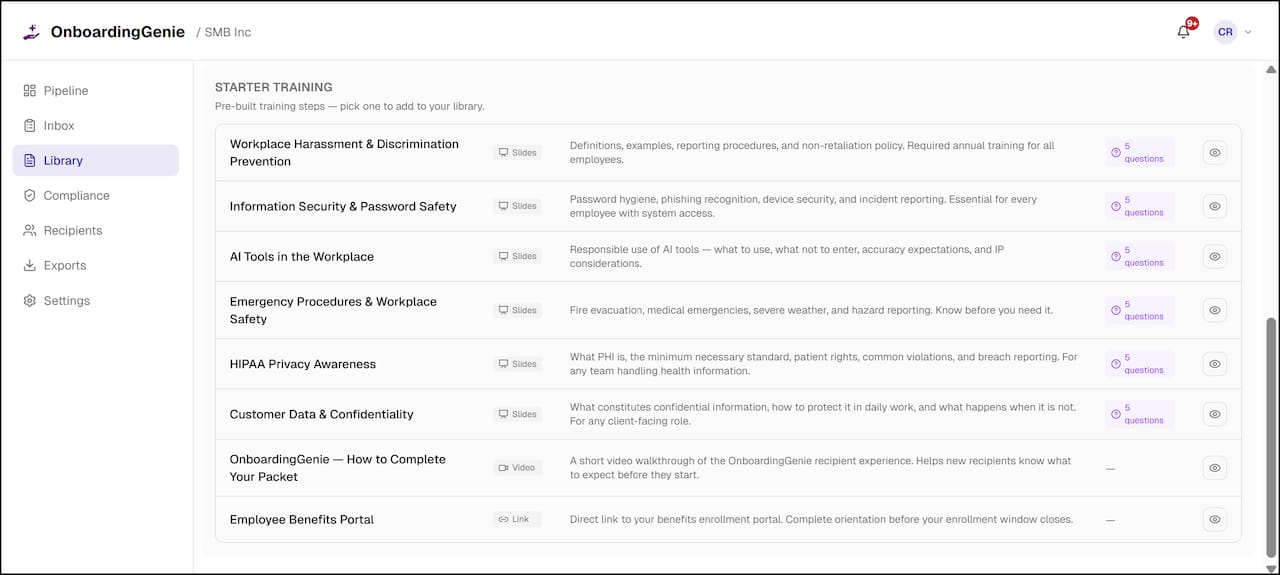
OnboardingGenie was built specifically for small to medium-sized service firms that need compliance and training delivery to actually work, without the enterprise price tag or the bloated feature sets. The platform consolidates your training modules, compliance acknowledgments, e-signatures, and completion records into a single branded portal. No more scattered links, no more spreadsheet tracking, and no more audit scrambles. Explore our HR training services to see how phased module delivery and automated tracking fit your workflow. Or check out our compliance management tools to see how audit-ready recordkeeping works in practice. Start free and see how clean, organized training delivery feels.
Frequently asked questions
What is the most efficient way to deliver HR compliance training to new hires?
Use phased, role-based modules with digital tracking and automated reminders for best results. Remote onboarding in particular requires a scheduled communication cadence and role-based training milestones to keep new hires on track without overwhelming them.
How can small businesses keep training audit-ready?
Store detailed records including completion timestamps, assignment proof, version history, and assessment results. Audit-ready compliance delivery goes well beyond a simple completion flag and requires capturing course metadata and follow-up documentation for any incomplete items.
Why does scenario-based training increase effectiveness?
Realistic scenarios build practical judgment skills and employee confidence, unlike passive policy reading. Scenario-based training maps directly to real workplace decisions, which means employees are better prepared when actual situations arise.
Does remote onboarding require special tools?
Yes, secure digital workflows and scheduled communication are essential for remote new hire compliance. Secure digital delivery ensures credentials, training assignments, and acknowledgments reach employees reliably and are documented properly from day one.
How often should HR update their training modules?
Annually review and refresh content to reflect policy changes and workforce needs. Continuous refresh based on data is a critical step in any scalable training program, ensuring your modules stay legally current and relevant to your team’s actual work.